Utilizing netstat command to check your Linux server network performance
2 min read
asrar

Here’s some of the netstat command to check your network performance or behavior in your Linux server.
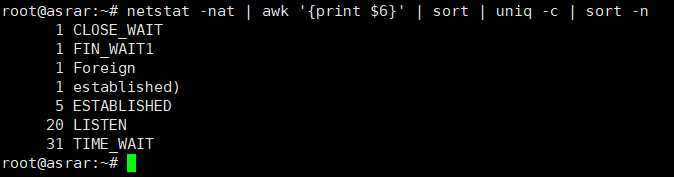
- Identified FIN_WAIT1, FOREIGN, SYNC_RECV, LAST_ACK, TIME_WAIT, LISTEN and ESTABLISHED Connections
#netstat -nat | awk ‘{print $6}’ | sort | uniq -c | sort -n
- Identified established and time_wait connections state
#netstat -etna|grep -i establi|wc -l
 Or
Or
#netstat -tupen |wc -l
 See the difference?
- Identified unique connection type
- Tracking connection type
```
#netstat -n -p | grep SYN\_REC | sort -u
```
* Get all ip address involved in the connection above
#netstat -n -p | grep SYN\_REC | awk ‘{print $5}’ | awk -F: ‘{print $1}’
* Get all ip address that SYN\_REC connection
#netstat -ntu | awk ‘{print $5}’ | cut -d: -f1 | sort | uniq -c | sort -n
* Calculate the number of connection from each unique ip address
\# netstat -anp |grep ‘tcp|udp’ | awk ‘{print $5}’ | cut -d: -f1 | sort | uniq -c | sort -n
* Counting connection for TCP or UDP to the server
\# netstat -ntu | grep ESTAB | awk ‘{print $5}’ | cut -d: -f1 | sort | uniq -c | sort -nr

* Get only ESTABLISHED connection of all connection with each ip count
\# netstat -plan|grep :80|awk {‘print $5’}|cut -d: -f 1|sort|uniq -c|sort -nk 1

Hope this helpfull.
Share this article
Discussion
Join the discussion
Loading comments...